Pro Tip: When moving to a new CMS, your content may be affected in how it is handled and presented on your new platform. To mitigate this, take the time to familiarize yourself with your new CMS platform and how it handles each aspect of your content such as page titles, formatting, and author bio.
Alert: We just launched a CMS migration tool to help you migrate from Sitecore, Optmizely, AEM, Contentful, and indeed any other CMS.
There’s no denying it: CMS migration is painful. And the harsh reality is, for more companies with legacy content management systems like Drupal, a CMS migration isn’t just a one-off annoyance, it’s an ongoing struggle.
But if your website, apps, and overall digital presence needs a revamp to keep up with consumer demands and expectations, then migrating your CMS may be your only option.
In this article, we’re taking a deep dive into what a CMS migration entails, the best practices and procedures to stick to, and what content management systems you should be considering.
What is a CMS Migration?
A CMS migration involves moving a website, a set of websites, or an entire digital presence which could span many different touch points, from one CMS provider to another.
Why would an organization want to take on such a mammoth task, you ask? Well, here are the reasons and motivations we encounter regularly:
Issues with website speed
High server downtime
Lack of support
The inability to handle large amounts of traffic or traffic spikes
Outdated features
Limited customization
Limited content distribution options (i.e. their existing CMS can’t offer headless content management)
One thing that we must clarify though is that a CMS migration is not the same as a website redesign. Web redesign concentrates on changing the aesthetics of how a website looks and feels so it can captivate the audience and generate more sales or engagement.
CMS migration can improve the design of a website, but it also takes into account all the core functionalities, features, and contexts of website management - improving the overall experience for both yourself and your visitors.
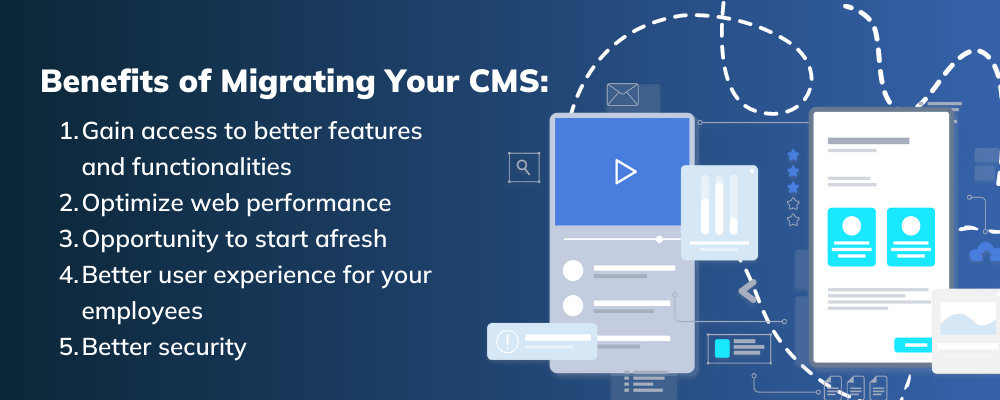
What are The Benefits of Migrating Your CMS?
The decision to migrate your CMS to another platform holds many benefits as we highlight below:
- Gain Access to Better Features and Functionalities
Shifting to a new CMS provider will give you access to a host of new features and functionalities, replacing those that are outdated and irrelevant on your old CMS. Better features can improve employee satisfaction and productivity.
- Optimize Web Performance
Most conventional CMS platforms tend to get overloaded as you add loads of different plugins and modules. Some of these add-ons are very resource-heavy, slowing down your website as a result.
We all know what happens to a website when it runs slow, it deters your visitors, increases your bounce rate, and puts a dent in your search engine rankings. Plus, you also miss out on revenue.
Migrating to a new CMS platform that makes effective use of its resources will perform much better - providing a better user experience as a result.
- Opportunity to Start Afresh
When a website is delivering a clunky performance, it is very tempting to throw away everything and start afresh.
CMS migration not only helps to revamp your website management, but it is also an opportunity for you to deploy a new design on your website.
- Better User Experience for Your Employees
Poor performing web management tools can really frustrate an employee from using your CMS. By migrating to a new CMS, that has taken on board the requirements and comments from staff, can not only improve their user experience but it can also improve their productivity and overall satisfaction.
- Better Security
Cybersecurity remains a number one concern for a majority of enterprises. There have been several high profile cases of CMS providers being involved in a security breach, affecting hundreds of big-name sites. When migrating to a new CMS provider, this is your opportunity to assess the security track records of a CMS provider and identify which is the most secure.
CMS Migration Best Practices: Migrating Content to a New CMS
The process of migrating to a new CMS can be somewhat tricky, especially when you are shifting large amounts of data and content. Since every CMS migration is unique, here are some best practices to follow:
- Hire a CMS Migration Project Manager
Having a dedicated project manager to oversee the CMS migration process can make a huge difference. The project manager will keep track of the different milestones and foster communication with all the stakeholders who will be using the platform - this includes content managers, content editors, marketers, and IT. They will break the entire migration process into smaller phases and delegate roles and responsibilities to members of the team.
In helping the project manager to get an overview of how the CMS migration is progressing, they will need access to project tracking tools. Workflows, spreadsheets, and project management software come in handy here - they will assist project managers in mapping out each aspect of the migration.
- Utilize Automated Tools
Content migration can be done either manually or automatically. The latter is where you will either create custom scripts or purchase a software. Automating your content migration is best suited for large databases, documents, and massive media libraries.
- Audit Your Content
Before you even start to migrate your data and content, you must take inventory of your content, meaning you have to thoroughly assess how your content is currently being managed on your old CMS platform. This includes file types, metadata, and hyperlinks.
- Develop a Strategy
Comb through each content type and decide if it needs to be migrated or not. If the content is irrelevant, then it can be deleted. Use this opportunity to outline how much revision and cleanup are necessary before the migration takes place. If the content requires custom coding, then make sure this is clearly annotated.
- Develop a Content Model
Categorize your content and use a spreadsheet to keep track of how the content is related to each other across different sections of the site. This overarching procedure will help put some order in your content, making it easier to search, sort, and filter within the back-end and front-end.
- Run Tests After Migration
Whether you decide to go down the manual or the automated route for your migration, it is imperative that you run tests to see how your content is presented on different devices and channels, including browsers on tablets, mobile, and laptop.
- Work with your Software Vendor
Whether you’re sticking with the same vendor or migrating to a totally new CMS, be sure to ask your vendor how they can help smooth the process over. At Zesty.io, we make a point of helping our customers with every digital step they take; and our dedication to customer service is noted across our Gartner Peer Insights reviews.
“Our [Zesty.io] account manager was very attentive and helpful with getting us started…”
— Infrastructure and Operations Specialist at a <$50M organization.Read their full Zesty.io review.
Your CMS Migration Checklist
To help you get started with your CMS migration, we’ve created this 3-phased checklist.
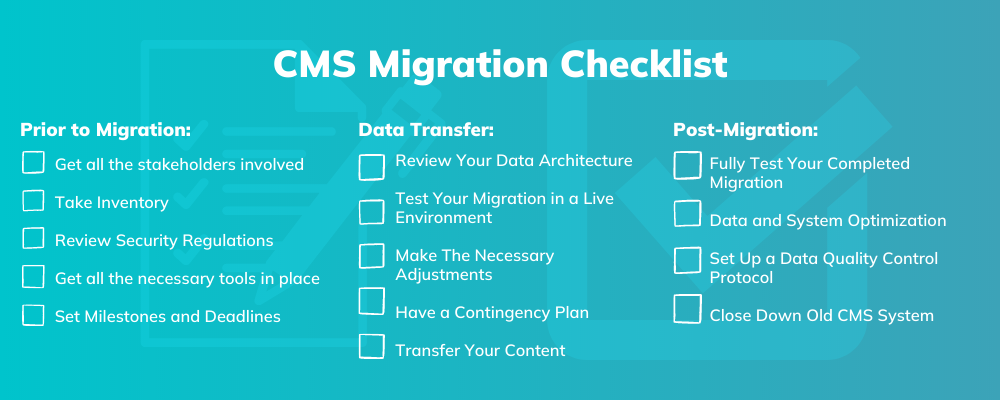
Prior to Migration
Conduct a pre-migration data assessment: Assess all the expenses and risks associated with the move. Depending on which CMS provider you choose to switch to, some migration procedures can result in a lengthy downtime, leading to loss of business - always aim to switch with a CMS platform that provides a seamless migration.
Get all the stakeholders involved: A successful migration is a team effort. Ensure you get all your stakeholders inline, this includes marketers, IT, support staff, senior management, and anyone else who is using the system. The reason why you need to get all the stakeholders involved is to help you take inventory of your content.
Take Inventory: As mentioned above under the best practices, take inventory of all your content, data and links. Keep the content that is most relevant, and remove any that is not - your stakeholders will assist you in this.
Review Security Regulations: With security being a major factor, do ensure your migration process comes in line with all the regulations, in particularly with GDPR since you’ll be handling a lot of data. We also recommend that you get official approval from key stakeholders as well.
Get all the necessary tools in place: Purchase any tools that you need for each aspect of the migration. You might want to set aside some time to demo some tools to see if it meets your requirements.
Set Milestones and Deadlines: Refine your migration strategy by setting targets for each aspect, and ensure this is communicated to all the stakeholders involved.
Data Transfer
Review Your Data Architecture: When mapping out your inventory, identify areas in your content that might deviate in another way after you’ve migrated (i.e. change in formatting). Consider how you could approach these differences.
Test Your Migration in a Live Environment: If possible, perform a trial migration on a large sample of data to pinpoint any flaws or defects.
Make The Necessary Adjustments: If you did perform a trial migration, make the required changes to your data, system configuration, or migration method. Also, if you haven’t done so, remove any old unwanted data/content to enable the transfer to happen faster and more efficiently.
Have a Contingency Plan: Migrations can cause major headaches, so it is best to have a plan B in place if the migration were to fail. Draw up worst-case scenarios and see what can be done to resolve the matter. Also, do ensure you back up all of your data and content beforehand and store it safely, even when the migration has been completed.
Transfer Your Content: Once all the necessary above steps have been done, you can proceed with the migration, whether manual or automated.
Post-Migration
Fully Test Your Completed Migration: Check for accuracy in your migration data and ensure it follows the appropriate format. In addition, we highly advise that you sample your content to check for data integrity.
Data and System Optimization: Despite your efforts during the preparation phase, there will be some things that you will have to adjust after your migration has been completed. The extent of what needs to be adjusted will depend on the size and complexities of the project.
Set Up a Data Quality Control Protocol: Since migration is a complicated procedure, some errors may remain undetected during the initial stages of testing. More so, those who are working on the new system will create new errors due to lack of experience with using the system. Therefore, it is crucial to have an ongoing quality monitoring protocol in place.
Close Down Old CMS System: Once the migration has been successfully completed, and you’re able to confirm your new CMS platform works smoothly, you can then proceed to decommission the old platform whenever you’re ready.
Best Enterprise CMS 2022
There are plenty of enterprise CMS options to choose from. We recommend that you choose an enterprise CMS platform that has headless capabilities that allow you to deliver content to any display and non-display device, something that cannot be done on a conventional CMS platform.
Here we’ve identified the top five enterprise CMS solutions:
Zesty.io is a headless CMS that features built-in custom JSON feed functionality, multi-site support, drag-and-drop content modeling, and more. It comes with an independent presentation layer that allows content creators to provision both text-based and media assets at any point of the development lifecycle. It also features a mobile-first approach, where it allows users to effectively deploy mobile experiences natively via its built-in responsive design framework.
Launched in 2017, GraphCMS was developed using GraphQL, which is an alternative data query language to REST. It comes with an intuitive content model editor that allows you to define the structure and relationship of all your content and data. The content model editor also allows you to set permissions for application data as well.
GraphCMS comes with a feature-rich editor to allow you to create any type of content without any technical knowledge.
ButterCMS was launched in 2014 and serves two distinct products: a headless CMS, and a standalone blog engine that can integrate with any pre-existing framework. ButterCMS’s headless CMS offering comes with a host of different features including custom content types, custom page types, preview capabilities, multi-site support, and media library.
dotCMS is an open source platform that brands itself as a hybrid CMS - which is essentially a decoupled CMS platform. Besides providing headless content management, it also features WYSIWYG editing, codeless workflow creation, SEO tools, drag-and-drop composition, and custom content types.
Directus is a free and open source headless CMS solution that you can retrieve from GitHub. Written on backbone.js, it comes with an admin interface that lets you manage your database content directly. According to Directus itself, the admin interface does not require any training.
Why Zesty.io is a Top CMS Migration Choice
Besides being one of the best headless CMS on the market, it is also the highest user-rated headless CMS on Gartner, with many developers and marketers complimenting on how intuitive the system is.
Zesty.io comes with a number of features for your developers to seamlessly and easily migrate your old CMS to Zesty.io:
Drag and Drop code importer: This tool enables you to drag and drop a text file (containing code) straight into Zesty.io’s interface. The importer negates the need for using an FTP or SCP file transfer.
Zesty.io Google WebMaster Integration: With this feature, you can update all the links on your website to redirect to your new platform.
CSV Import Tool: For content migration, Zesty.io enables you to import a CSV file - which contains all content and data - from your old CMS provider.
All of these tools allow you to migrate your site in a short amount of time.
Whatsmore, Zesty.io is a headless CMS that has been developed with the marketer in mind. Zesty.io’s Content-First™ approach allows marketers to create sites and push content in minutes, all while reducing reliance on IT. With Zesty.io, the marketers are in control.
And with it being a decoupled headless solution, marketers can produce and distribute content to any IoT device and touchpoint, including those that are yet to be released. It is a future-proof solution, meaning once you migrate to Zesty.io, you’ll never have to migrate again.
Also, Zesty.io is built on an API-driven environment, which enables you to integrate with a multitude to tools and features to deliver a better experience.
Don’t Delay Your CMS Migration
If you decide to delay your CMS migration, you risk falling behind your competition.
Legacy CMS solutions are struggling to adopt in the IoT-era since most of them are only able to deliver to web-based applications. Headless CMS, on the other hand, can deliver to a multitude of devices and channels.
Zesty.io is one of the best rated headless CMS platforms on the market, and following the procedures and practices outlined above, you can rest assure, your CMS migration will go smoothly without having to endure a lengthy downtime.
Thanks for reading. To find out how Zesty.io can help you with your CMS migration, please get in touch today.

By Gisele Blair
A designer knows he has achieved perfection not when there is nothing left to add, but when there is nothing left to take away.